
A Claude Skill is a folder with a SKILL.md file that holds your team's context and steps for one job, such as underwriting an office-condo OM. Claude loads it when a request matches its description. Create one in Customize > Skills by asking Claude to draft it, writing it yourself, or uploading a zip. Skills need code execution turned on.
The AI in Real Estate Field Guide puts four applied CRE workflows, an eight-question readiness scorecard and a 30-day pilot plan in one 18-page PDF.
Why does Claude's underwriting change from deal to deal?
The process lives in the prompt, and the prompt lives in someone's head. A May 2026 survey by First American Data & Analytics and DealGround of 255 CRE professionals found 66% use AI weekly or daily, but only 5% trust it enough to inform deal decisions.
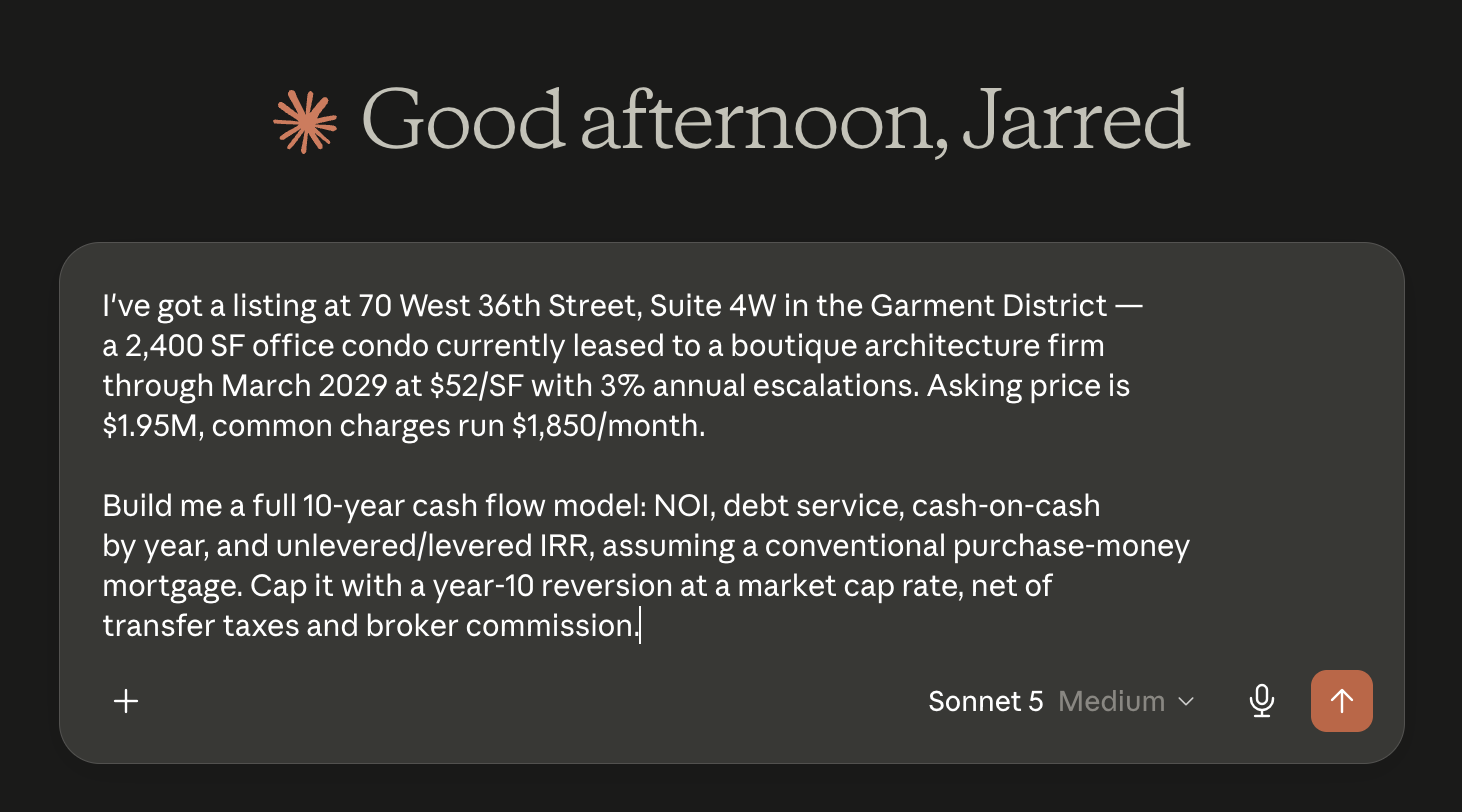
Nothing is wrong with this prompt except that it gets rewritten next time, slightly differently, by whoever is at the keyboard. A Skill fixes the input side.
What is a Claude Skill?
A reusable set of instructions Claude follows for one kind of task. Every prompt carries two things:
- Context: what Claude needs to know, such as your investment criteria, which source wins when the OM and the rent roll disagree, and the format your team expects.
- Steps: what Claude should do, in order.
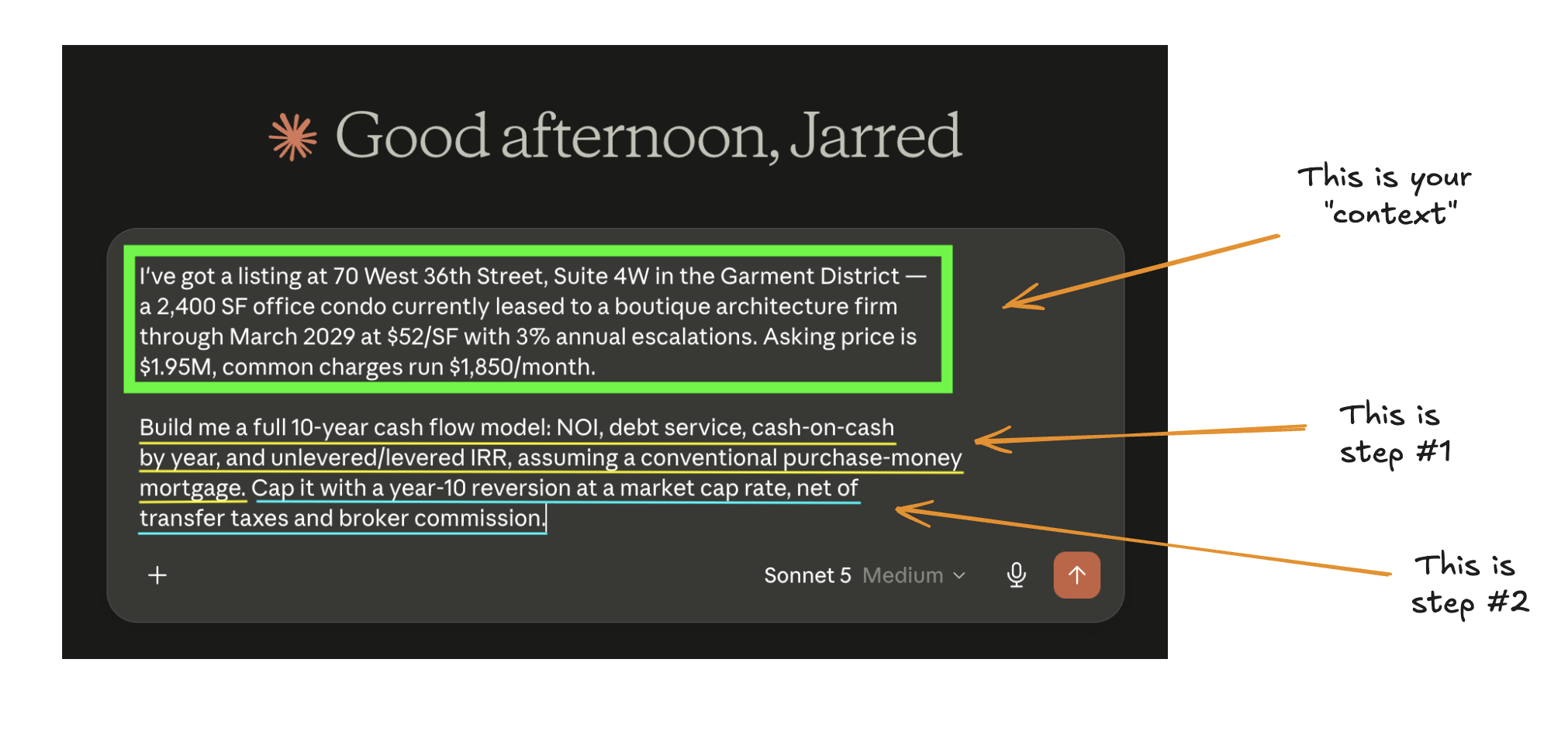
A Skill stores both in a plain-text Markdown file called SKILL.md, with a name and one-line description at the top. Claude reads only the description until a request matches it, then loads the rest, so the description matters most. See how to write a SKILL.md that gets used.
How do you create a Skill in Claude?
- Turn on code execution. On a personal plan it is in Settings > Capabilities. On Team and Enterprise, an owner enables it under Organization settings > Plugins & skills.
- Open Customize > Skills, click +, then Create skill.
- Choose a route. Best start: describe the workflow, property type, inputs and deliverable, and Claude drafts the file. Writing it yourself is slower. Uploading takes a zip with the skill folder at its root, which installs a Skill someone else built.
- Test it on a deal you have already underwritten and compare the result with your analyst's model. Fix the instructions, not the output.
- Share it. On Team and Enterprise plans, share with colleagues or publish to the organization's library.
As of September 2026, Pro, Max and Team plans in Cowork on Mac can also record you doing the task and build the Skill from it. Source: Anthropic's help pages on using and creating Skills.
A starting prompt for the Create-with-Claude route:
Help me create a Skill for underwriting [property type] offering memorandums.

Inputs: an OM PDF and our assumptions sheet.
Steps:
1. Extract every figure the OM states, with the page it came from.
2. List what the OM does not cover.
3. Ask me to confirm those assumptions before building anything.
4. Build a ten-year cash flow in Excel with our tab order:
   Inputs, Rent Roll, Cash Flow, Returns.
5. Put open questions on the first tab.

Never fill a missing assumption silently.
Example: an office-condo underwriting Skill
Our nyc-office-condo-underwriting Skill is free to download. The .skill file is a zip archive; upload it as it is. Every time it runs, Claude follows the same sequence:
- Read the OM and record where each figure came from.
- Identify what the OM does not cover.
- Ask you to confirm the missing assumptions.
- Build the ten-year investor cash flow.
- Deliver the model as an Excel workbook.
It carries what a generic prompt leaves out: common charges replace most of what CAM covers in a whole building, a condo unit has no separate land value, and the exit carries New York City and State transfer taxes, which it asks about rather than recalls because rates change. It works only from the OM and what you confirm. Use it as a pattern; your Skill carries your criteria and template.
What belongs in a CRE Skill, and what does not?
Put in:
- Which source wins when the OM, the rent roll and your own data disagree.
- Your investment criteria and hold assumptions.
- The exact output: file type, tab order, which figures must stay live formulas.
- A stop-and-ask step for anything the documents do not state.
- One worked example of a finished deliverable.
Leave out:
- Figures that change, such as tax rates, interest rates and market rents. Tell Claude to ask for them.
- Licensed data your vendor does not allow in AI tools. See Can Claude connect to CoStar?
- Passwords, API keys and client details that do not need to travel with the method.
Common failures: a description too vague to trigger, a Skill that tries to cover all underwriting, and no stop-and-ask step, so Claude fills gaps with plausible numbers.
Where do Skills stop?
A Skill holds the method and does not reach your systems. Pulling a rent roll from Yardi or logging a contact in your CRM needs a connector. See also Claude Skills vs MCP.
Common questions
Which Claude plans include Skills?
As of September 2026, Skills are available on Free, Pro, Max, Team and Enterprise plans, and code execution must be turned on. On Team and Enterprise plans an owner controls Skills in organization settings and can provision a Skill for everyone in the organization.
How is a Skill different from a Claude Project?
A Project holds files and instructions for one workspace. A Skill is a packaged method Claude can pick up in any conversation when a request matches its description. Many teams keep the deal files in a Project and the underwriting method in a Skill.
How many Skills should a CRE team start with?
One. Pick one property type and one output your team already checks, such as a ten-year cash flow for office condos. Test it on three deals you have already underwritten, and add a second Skill only when the first one matches your analysts.
Continue with the commercial real estate AI workflow hub, or read the original version in the altr'd newsletter on LinkedIn.